


Messenger: SMS Home Launcher
4.143.00 Reviews
App Specs
- Version
- 2.8
- Updated On
- License
- Free
- Downloads
- 1,000,000+
- Developer
- JB DEVELOPER APP
- Categories
- Communication
- Platform
- Android
Screenshots
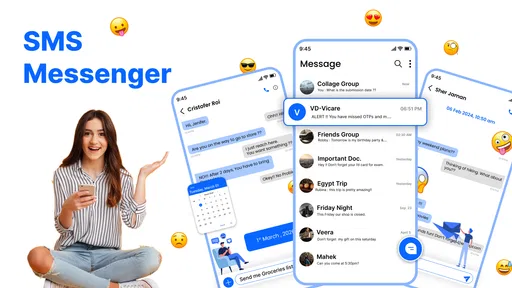
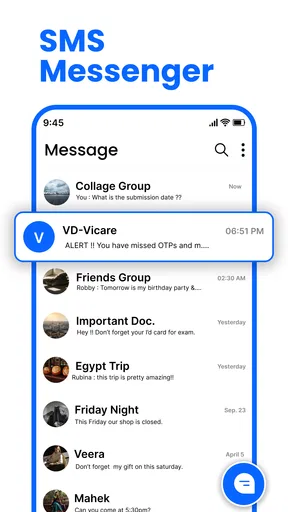
 Analysis by AppCompare
Most of the time, texting feels effortless: tap a conversation, write a few words, and carry on. The difference becomes clearer when you’re moving between errands, trying to keep a family thread readable, or relying on a quick reply while your attention is elsewhere. Messenger: SMS Home is a communication app from JB DEVELOPER APP that gives the familiar SMS routine a more customizable home. I’d consider it when I want everyday messaging to feel more personal, but I’d also judge it by how well it fits the way I already communicate—not just by how many options it offers.
When a connection helps—and when it does not
Messages do not all behave alike on a phone. Standard SMS, multimedia messages, and internet-based chat can depend on different network conditions, so a message that works in one situation may be delayed or fail in another. I would not treat a new messaging interface as a cure for weak reception or assume every type of message uses the same connection. The practical thing is to notice what kind of message you are sending and whether the phone has service at that moment.
For a simple text to someone nearby, a stable mobile signal is usually the main concern. Sending a photo, sharing a link, or messaging a group can involve more than a short text, so poor reception may become more noticeable. When a conversation matters, I find it sensible to check whether the message appears to have gone through before assuming the other person has received it. That small habit is more useful than repeatedly tapping send and risking confusion.
I also separate the app’s role from the network’s role. A messaging app can make conversations easier to browse and give me a layout I prefer, while delivery still depends on the relevant messaging service and connection. If a message is time-sensitive, I would not rely on a visual refresh or a scheduled send as proof that it reached its recipient; I would look for a clear delivery indication or follow up through a channel suited to the urgency.
Useful in the small gaps of a busy day
The app’s appeal is easiest to picture in ordinary routines rather than elaborate setups. I might use a quick reply when I’m carrying groceries and want to tell someone I’ll be a few minutes late. A scheduled message could help me prepare a reminder before I get distracted, while customization can make a busy inbox feel more like my own space. These are modest conveniences, but they can reduce the little bits of friction that make texting feel like another task on a crowded day.
On the move, I would keep the workflow simple: open the relevant conversation, check the recipient, write a short message, and confirm it has sent when the connection is uncertain. Longer messages and media sharing are better handled when I can pause and verify what I’m sending. That is especially true in a group conversation, where a quick reply intended for one person can easily be misunderstood if the thread is not the one I meant to open.
Customization is a personal preference, not automatically a productivity gain. Changing colors, themes, or fonts may make the app more comfortable to read, but I’d choose legibility over novelty—particularly if I check messages outdoors or in a hurry. A useful approach is to settle on a clear appearance first, then leave it alone for a while. Constantly changing the look can take more time than it saves.
Worth Reading Before You Choose

Baby Panda World Brings Quick Play to Modern Phones, but Its Game Library Feels Busy

ESPN’s Live Game View Makes Following Close Games Easier

QuizzLand Review: A Good Fit for Short Trivia Breaks, Not Every Player

Basketball Stars: Multiplayer Is Fast, but Can It Recover When Matches Go Wrong?

WEBTOON Turns Phone Updates Into a Better Reading Routine

Link to Windows Runs on Shared Habits, Not Social Feeds
Why Messenger: SMS Home Stands Out
The first thing that caught my eye was the slick, user-friendly interface. It’s not just eye candy, though. Navigating through your messages feels intuitive and smooth. I mean, who wants to fuss around when all you want to do is send a quick text?
One of the standout features of Messenger: SMS Home is its customization options. You can tweak the colors, themes, and even the font. It's like personalizing your digital space to reflect your vibe. I found myself spending a good amount of time just playing around with these settings. It’s oddly satisfying!
What to check before making it your default
If I were switching from the messaging app that came with my phone, I would first check how Messenger: SMS Home handles the conversations and message types I use most. A new app is only convenient if it fits my contacts, group threads, and media habits without making everyday exchanges harder. I would test a short text, a group message, and a photo message with someone I know, then make sure replies arrive where I expect. That quick trial is a better guide than changing every setting on the first day.
People often wonder whether a messaging app will replace every other way they talk. I would not expect that. SMS-focused communication is useful for reaching people through familiar phone messaging, while internet chat services may be a better fit for people who primarily use accounts, large groups, or richer online communities. If my friends and family are spread across several services, I may still need those services; installing this app does not by itself make everyone available in one place.
There is also a privacy distinction worth keeping clear. The original review describes a privacy mode, but I would not read that phrase as a guarantee of encryption, protection from every person with access to the device, or secure delivery over every network. I’d use any privacy controls as an added convenience, keep the phone itself protected, and avoid sending sensitive information by ordinary text when a more appropriate secure channel is needed.
Features That Make a Difference
Now, let’s talk features. First off, the app supports all the essentials you’d expect from a modern messaging app, like group chats and multimedia messaging. But where it really shines is in the little extras.
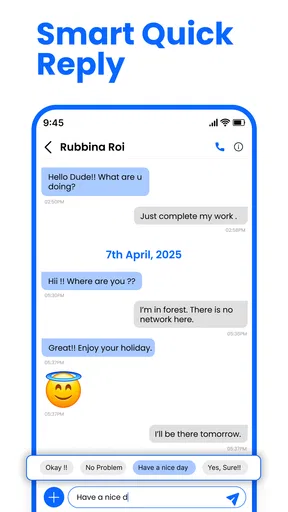
- Quick Replies: This feature is a lifesaver. You can set up custom quick replies for those moments when you’re in a rush. It’s like having a preset text arsenal at your fingertips.
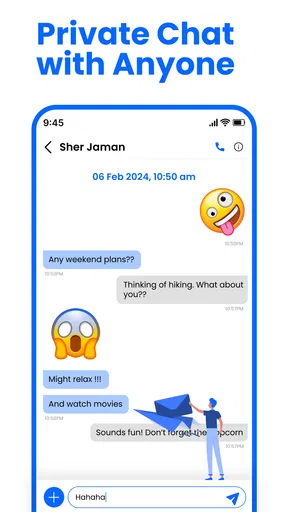
- Privacy Mode: Concerned about prying eyes? The privacy mode ensures your conversations stay just between you and your recipient. It’s like having an extra layer of security.
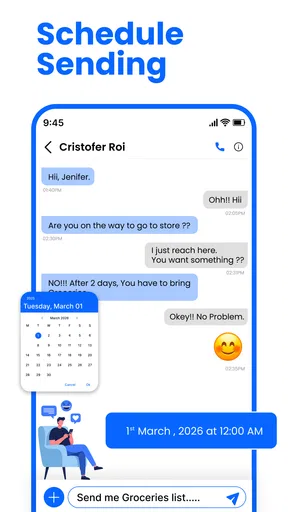
- Scheduled Messages: Ever forget a birthday or an important meeting reminder? With scheduled messages, you can queue up texts to be sent at a later time. It’s like having a personal assistant.
Planning messages without creating new problems
Quick replies work best when I keep them genuinely useful and neutral. A short “I’m on my way” or “I’ll reply later” can save typing, but a reply that sounds too automatic may confuse someone who needs a specific answer. I would avoid saving anything that could be sent to the wrong person or misrepresent what I mean. The convenience comes from reducing keystrokes, not from letting a preset replace judgment.
Scheduled messages are most helpful for a reminder or a greeting that does not depend on changing circumstances. Before scheduling one, I’d check the recipient and the wording, then consider whether the message will still make sense when it arrives. A plan can change, and a queued text may not reflect that. For anything urgent, I would send it directly and confirm delivery rather than relying on a message arranged in advance.
Those tools also make connectivity part of the decision. Scheduling a message may help me prepare it at a convenient time, but it should not be confused with guaranteed delivery at a particular moment under every network condition. If the message is important, I’d check the app’s status afterward and use another contact method if the timing matters. The same caution applies to media: when reception is poor, a plain text may be the more dependable way to communicate the essential point.
Recovery, data use, and everyday trade-offs
When something seems stuck, I try not to send the same message several times. I first check the conversation, the recipient, and the phone’s signal, then give the original attempt a moment before deciding what to do. If it still has not gone through, I can try again once conditions improve or contact the person another way. This avoids the awkward possibility of duplicate messages arriving together after service returns.
If a photo or other media is slow to send, I would consider whether it is actually necessary. A concise text can carry the key information with less waiting, and I can send the image later when the connection is steadier. That is a practical data-conscious habit, especially when I am away from Wi-Fi or trying to avoid unnecessary transfers. I would also be mindful that media messaging may be handled differently from ordinary texts by the phone service or plan.
For someone who wants a visually adjustable place for everyday SMS, the app has a clear reason to be appealing. It is less compelling for a person who expects one application to unify every online chat, or who needs detailed control over message delivery and privacy guarantees. People who rarely customize their phone may prefer the default messaging app simply because it is already familiar. Switching makes sense when the interface and the listed tools solve a real annoyance, not just because a new app offers more things to explore.
Messenger: SMS Home is free to install, with optional in-app purchases listed from $3.49 to $5.49 per item. I’d start by seeing whether the free experience suits my routine before paying for anything; the purchase range alone does not tell me which extras are worth it for my needs. It has a 4.2 average from around 1,000 ratings and over 500,000 installs, which suggests that many people have tried it, though those figures cannot tell me whether it will fit my contacts or habits. Its Teen content rating is another practical point for families considering the app on a shared or younger user’s device.
Compatibility matters before switching, too. The app’s current version is 1.3 and it requires Android 8.0 or later, so I would check the phone’s software version first. If I use an iPhone, I would look for the appropriate iOS availability rather than assume an Android app works there. That simple check prevents a frustrating download attempt and keeps expectations grounded.
The app also integrates smoothly with other services, so sharing media, links, or even your location is a breeze. It’s designed to keep you connected effortlessly.
Who I’d recommend it to
I’d point this app toward someone who mainly texts by phone number, likes adjusting the look of an interface, and would actually use quick replies or scheduled messages. It may be a good fit for a person who wants familiar messaging with a more personal feel rather than a full social platform. Someone coordinating school pickups, errands, or a family plan could appreciate having common replies ready and being able to prepare a message before a busy stretch of the day.
Here’s a realistic example: I’m heading home, my hands are full, and a family member asks when I’ll arrive. A short saved reply can communicate that I’m on my way without needing a long exchange. Later, when I have a moment, I can send a more detailed update. If the signal is weak, I’d keep the first message brief and check that it went through, rather than assume a photo or longer message will arrive immediately.
I’d steer a heavy internet-chat user toward the services their contacts already use. If most conversations happen in an account-based messaging platform with features beyond SMS, changing the default texting app may add another inbox without reducing the others. And if privacy is the main reason for switching, I would compare the actual protections of dedicated secure messengers rather than infer strong security from a mode name.
My Final Thoughts
So, is Messenger: SMS Home worth the download? If you’re looking for an app that merges functionality with a touch of flair, then absolutely. It’s not just about sending messages; it’s about enhancing the way you communicate.
Whether you’re a texting enthusiast or someone who just wants a reliable app that doesn’t feel like a chore to use, this one’s a winner. Give it a shot, and who knows, you might just find yourself wondering how you ever texted without it.
My more measured recommendation is to try it when you want a different feel for everyday texting and are comfortable checking how it works with your phone and contacts. Keep the quick replies practical, treat scheduled sends as a convenience rather than a delivery guarantee, and choose a readable theme over one that only looks striking. For reliable communication, the network and the recipient’s messaging setup still matter as much as the interface.
Pros
- User-friendly and intuitive interface.
- Seamless integration with contacts.
- Customizable notification settings.
- Secure end-to-end encryption.
- Supports multimedia sharing efficiently.
Cons
- Contains in-app advertisements.
- Limited theme customization options.
- Occasional app crashes reported.
- Requires constant internet connection.
- Lacks advanced messaging features.
FAQs for Messenger: SMS Home Launcher
What features does Messenger: SMS Home offer?
Messenger: SMS Home provides a comprehensive messaging experience, including SMS, MMS, and chat features. It supports multimedia sharing, group chats, and customizable themes. The app also integrates with your device’s contacts to offer seamless communication. Additionally, it includes a spam filter to keep unwanted messages at bay.
Is Messenger: SMS Home secure and private?
Yes, Messenger: SMS Home prioritizes user privacy and security. It includes end-to-end encryption for messages, ensuring that only you and the recipient can read them. The app also offers customizable privacy settings, allowing you to manage who can contact you and how your data is handled.
Can I customize my messaging experience with this app?
Absolutely! Messenger: SMS Home allows extensive customization options, including themes, fonts, and notification sounds. Users can personalize their chat backgrounds and choose from a variety of color schemes to match their preferences, making the messaging experience truly unique and enjoyable.
Does Messenger: SMS Home support multimedia messages?
Yes, Messenger: SMS Home fully supports multimedia messaging. You can easily send and receive photos, videos, and voice notes. The app ensures that media files are delivered quickly and efficiently, maintaining high quality while optimizing for faster transmission and minimal data usage.
How does Messenger: SMS Home handle spam messages?
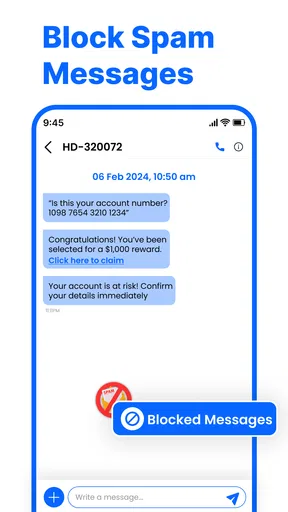
The app includes an effective spam filter that automatically detects and blocks unwanted messages. This feature helps maintain a clean inbox and reduces the risk of phishing and other scams. Users can also manually mark messages as spam and adjust spam detection settings according to their preferences.


